


Wise: International Transfers
4.818.60K Reviews
App Specs
- Version
- 9.39.0
- Updated On
- License
- Free
- Downloads
- 50,000,000+
- Developer
- Wise Payments Ltd.
- Categories
- Finance
- Platform
- Android, iOS
Screenshots


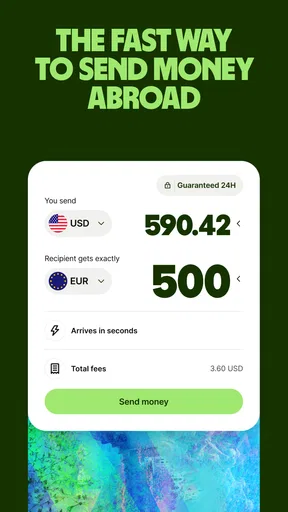

 Analysis by AppCompare
I find the most revealing part of using Wise is how much the experience depends on being connected at the right moment. It is a finance app from Wise Payments Ltd., built around moving and managing money across borders, so checking a quote, confirming a transfer, or reviewing its progress is not the same as casually browsing a static account screen. When I have a reliable connection, the steps feel straightforward; when service is patchy, I treat anything involving a payment as something to pause and verify rather than rush through.
That distinction matters if you are deciding whether it belongs in your everyday setup. Wise is free to download, has an Everyone age rating, and its 4.8 average comes from around 1.9 million ratings. Those figures point to a widely used finance app, but they do not remove the need to check the details of your own transfer before approving it. I would use the app for an international payment I can plan and review, not assume that every transaction will arrive immediately or work the same way in every country.
When the connection becomes part of the transfer
A useful habit is to separate preparing a payment from sending it. I would gather the recipient’s information first, then open the app when I can give the quote and confirmation screens my attention. That reduces the chance of mistyping a detail while juggling a weak signal or switching between apps to find account information. It also gives me a clear moment to check the amount, currency, and expected delivery information shown before I commit.
The transfer tracker is reassuring once a payment is underway, but it is most useful as a status check, not a promise that the recipient’s bank will process everything instantly. If a transfer appears to be taking longer than expected, I would first check its status in Wise and avoid sending a duplicate just because I am impatient. The distinction between a payment being initiated and money being available to the recipient is worth keeping in mind, especially when timing matters.
Built for moving between places and currencies
On a phone, Wise makes the most sense when I need to make a focused money decision away from a desk: checking a conversion before paying, following a transfer while travelling, or seeing whether an incoming payment has arrived. Its current version is 9.27.0, and it supports Android 7.0 or later; it is also available on iOS. I would still update the app and use a secure connection before handling account details, particularly on a shared or public network.
For an everyday scenario, imagine I am travelling and need to send money to someone at home while keeping an eye on a balance in another currency. I can use the app to review the conversion and transfer details, confirm only when they look right, then return later to check progress. The practical benefit is having the steps and status in one mobile place. The trade-off is that I should not start the process while rushing through an airport or relying on a connection that may drop during confirmation.
What to do when something does not go smoothly
Financial apps deserve a calmer recovery routine than ordinary shopping apps. If the screen freezes or the connection disappears near the end of a transfer, I would reopen Wise and inspect the transaction history or status before trying again. Repeating the payment without checking could create a second transfer rather than fix the first. If the app asks me to verify something, I would finish that process carefully instead of treating it as an optional interruption.
Worth Reading Before You Choose

Baby Panda World Brings Quick Play to Modern Phones, but Its Game Library Feels Busy

ESPN’s Live Game View Makes Following Close Games Easier

QuizzLand Review: A Good Fit for Short Trivia Breaks, Not Every Player

Basketball Stars: Multiplayer Is Fast, but Can It Recover When Matches Go Wrong?

WEBTOON Turns Phone Updates Into a Better Reading Routine

Link to Windows Runs on Shared Habits, Not Social Feeds
That care is also why I would not make Wise my only plan for a time-critical payment. Transfer speed can vary, and a mobile connection cannot control how quickly institutions on either side handle the money. If rent, a bill, or another deadline depends on funds arriving by a specific time, I would send early and keep a suitable backup payment method available. Wise can make cross-border steps easier to manage, but it cannot remove every delay outside the app.
Using mobile data without losing track
I would avoid opening the app repeatedly just to refresh a transfer while away from Wi-Fi. A more practical approach is to check when there is a real reason—after sending, near an expected arrival, or when I need to confirm a balance—rather than turning every spare moment into a status check. That keeps the task focused and makes it easier to notice a meaningful change instead of scanning the same screen over and over.
Notifications can help bring attention to account activity, but I would treat them as prompts to review the app, not as a substitute for checking the transaction itself. On a shared screen, I would also be mindful of what account information is visible. The app’s transaction alerts and two-factor authentication add useful layers to account awareness, while good habits still matter: lock the phone, protect sign-in details, and double-check recipient information before confirming.
Who benefits most—and who may prefer another route
I see Wise as a strong fit for people who regularly receive or send money across borders, travel between currencies, or work with clients in more than one country. The multi-currency account can make those routines easier to organize than keeping separate mental calculations in a notes app. It is less compelling if I only make domestic payments in one currency and already have a bank account that handles those needs simply.
Compared with a conventional bank transfer, Wise puts currency conversion and transfer tracking closer to the centre of the experience, which can make costs and progress easier to review. A bank may still be the better choice when I need an established domestic payment workflow, prefer keeping everything with my existing provider, or have a specific service arrangement there. A cash-transfer service may suit someone who needs a recipient to collect cash, while Wise is more naturally useful when the goal is managing money digitally across currencies. I would compare the exact fees, delivery estimate, and recipient options for the particular payment rather than assume one provider wins every time.
There is also a practical learning curve: holding several currencies is useful only if I keep track of which balance I am spending from and what conversion I am accepting. Before a trip, I would review the currencies I actually expect to use instead of converting casually just because the option is available. For freelance income, I would keep a simple record of which client paid in which currency and when I moved funds. That small bit of organization helps the convenience stay convenient.
Wise has been around since March 24, 2014, and has more than 50 million installs. Its scale is reassuring as a sign that it is an established option, but I would still judge it by the specific transfer in front of me: the recipient details, the rate, any displayed charges, and the timing. It is a finance tool, not a reason to skip those checks.
So, I finally got around to checking out Wise: International Transfers, and let me tell you, it’s a game-changer for anyone dealing with multiple currencies. If you’re like me, tired of hidden fees and dodgy exchange rates, this app might just be your new best friend.
Getting Started with Wise
First things first, setting up Wise: International Transfers was a breeze. The registration process didn’t make me want to pull my hair out, which is always a plus. I just popped in some basic info, verified my identity, and I was ready to roll. The interface is clean and intuitive, making it super easy to navigate. Even if you’re not tech-savvy, you’ll find your way around in no time.
What Makes Wise Stand Out?
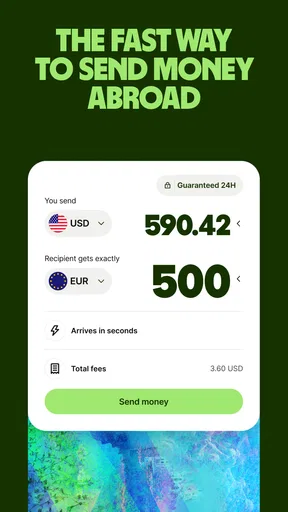
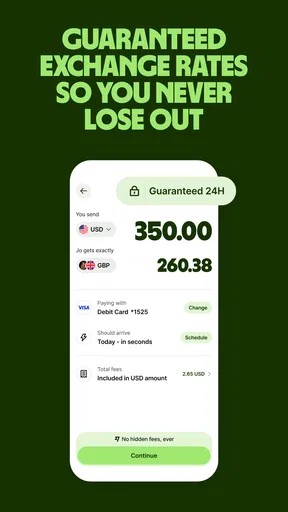
Now, onto the juicy bits—what makes Wise so special? For starters, the app uses the real mid-market exchange rate, which means you’re getting the most bang for your buck without any sneaky markups. It’s transparent, so you always know what you’re paying for. I found this incredibly refreshing compared to traditional banks that often leave you in the dark.
Another standout feature is the speed of transfers. I was pleasantly surprised to see some funds arrive in minutes, although it can take a bit longer depending on the currency and country. Still, it’s generally faster than most banks. Plus, you can track your transfer every step of the way, which is a nice touch for peace of mind.
Using the Multi-Currency Account
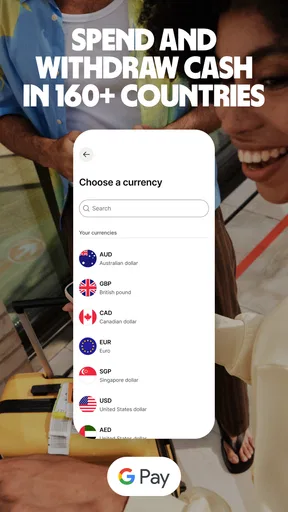
One of the coolest features has to be the multi-currency account. Imagine holding over 50 currencies in one place! This is perfect for travelers or freelancers like me who deal with international clients. I could easily convert between currencies, and the app showed me exactly what I’d get before I hit the button.
Not to mention, you can get local bank details in different countries, allowing you to get paid like a local. How handy is that? It really simplifies receiving payments from abroad without the hassle of international wire transfers.
Security Features
Security-wise, Wise doesn’t skimp. It’s regulated by financial authorities around the world, and they use two-factor authentication to keep your account secure. I felt pretty safe knowing my money and details were in good hands.
Also, the app sends notifications for every transaction, helping you keep tabs on your spending and transfers. In today’s world, that extra layer of security is a must.
User Experience
The overall user experience is stellar. Wise is available on both Android and iOS, and it runs smoothly on both platforms. The app feels responsive, and I didn’t encounter any glitches during my time using it. The customer support is also top-notch. I had a few questions, and their team was quick to respond and super helpful.
The app’s design is sleek and modern, making it visually appealing while still functional. You can tell a lot of thought went into making the user journey as seamless as possible.
Final Thoughts
In a nutshell, if you’re dealing with international transfers regularly, Wise is an app you should definitely consider. It takes the stress out of sending money abroad, offering a transparent and efficient solution. The ability to hold and manage multiple currencies in one place is invaluable, and the app’s security features ensure your transactions are safe.
Whether you’re a digital nomad, an expat, or just someone who needs to send money overseas occasionally, Wise has something to offer. So why not give it a shot? You might just find it’s the app you didn’t know you needed.
My connectivity verdict
For me, the best reason to install Wise is having a clear place to review an international payment and its progress on a phone. The app is free, and its long-standing focus on cross-border money makes it worth considering for people with recurring currency needs. I would not choose it simply because a transfer sounds fast, though: I would check the quote, allow time for processing, and make sure I have dependable access when confirming important transactions.
If you mainly need a simple domestic account, your existing bank may be less effort. If you often move money internationally, Wise offers a more purpose-built way to handle currency conversion and follow transfers. My recommendation is to try it for a non-urgent, clearly planned payment first, learn how its screens present the details, and then decide whether it fits your routine. The convenience is real, but it works best when paired with careful checks and a stable connection.
Pros
- User-friendly interface
- easy navigation.
- Competitive exchange rates offered.
- Supports multiple currencies worldwide.
- Fast transfer processing times.
- Strong security features for transactions.
Cons
- Higher fees for small transfers.
- Limited customer support options.
- No cash pickup service available.
- Requires internet connection to use.
- Verification process can be lengthy.
FAQs for Wise: International Transfers
What is Wise and how does it work?
Wise, formerly known as TransferWise, is an online financial service that allows users to send money internationally with low fees. The app uses the real exchange rate and a unique peer-to-peer system, ensuring users get the best rates. Simply sign up, enter the amount and currency, and let Wise handle the rest.
Is Wise safe to use for international transfers?
Yes, Wise is a secure platform for international transfers. It is regulated by financial authorities in each country it operates, including the Financial Conduct Authority (FCA) in the UK and FinCEN in the US. Additionally, it uses advanced encryption and security protocols to protect user data and transactions.
How long does an international transfer take with Wise?
The time it takes for a transfer to complete with Wise depends on the country and currency. Generally, most transfers are completed within 1-2 business days. However, some transfers can be instant or take slightly longer depending on bank processing times and local holidays.
What are the fees associated with using Wise?
Wise is known for its transparent fee structure. It charges a small, upfront fee based on the amount and currency of the transfer. There are no hidden fees, and the exchange rate used is the mid-market rate, which is generally more favorable than those offered by traditional banks.
Can I use Wise for business transactions?
Yes, Wise offers solutions for businesses, allowing them to make international payments, invoice customers, and pay employees. Business accounts come with additional features like batch payments and integration with accounting software, making it a convenient choice for managing international finance.


